TSS/360: User types
As you'd expect from IBM, security was an important part of the design of TSS/360, and rather than the simple super-user/normal user distinction we've seen on other operating systems, they separated users into different classes. In this post we'll look at each class in more detail.
The user hierarchy
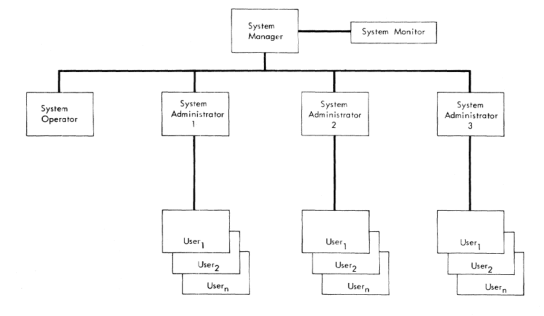 TSS User hierarchy. Source: TSS System Managers and Administrators Guide on Bitsavers
At the root of the system is the System Manager, who can create and remove all other accounts on the system. The Operator is responsible for actions needed to keep the machine running, such as system start up and shutdown, and dealing with physical devices like tapes. Both these accounts are set up when the system is first generated.
System Administrators are created by the System Manager and control account creation for a subset of users, such as a department.
Regular users have limited access to system management or operations commands - for example, they can show the batch queue, but only for jobs they submitted. A special bit can be set on a user to mark them as a system programmer, however, which allows them access to system debugging tools.
A final class, not shown on the diagram, is System Monitor users who can collect performance information about the system.
The system on the disks we are using has the following users set up.
| Login | Password | Type |
|---|---|---|
sysmangr |
ibm |
System Manager |
sysoper0 |
Always logged in to console | Operator |
tss |
ibm |
User with System Programmer bit set |
Creating a new user
You will probably want to set up your own user account rather than using one of the above IDs. As we don't have system administrators set up, we can do this directly by the system manager.
At the user console, logon as sysmangr password ibm
logon sysmangr,ibm
  TASKID=0013 LOGON AT 01:24 ON 01/01/27
Then use the JOIN command to add a new user. At a minimum you need to supply the user name, password, and charge account (here 0).
join userid=rupert,password=secret,charge=0
Additional parameters can be set: PRIV for the user type, here a
regular user; AUTH for the system programmer bit, PRIORITY for an
indication on how to schedule the user's tasks, from 0 to 9 with 0
being highest priority. See the manual linked below for more details.
Passwords can be 1-8 alphanumeric characters; lower case letters are
mapped to upper case. A password of a quoted space PASSWORD=" " means
no password will be set.
Once the user is set up, log off (using the technique to clear the logoff error shown in the quick start) and logon again under the new ID.
The other commands specific to the system manager and administrators
are REJOIN to adjust parameters for an existing user ID, and QUIT
to remove an ID. As far as I can tell there is no way to list the
users with defined accounts on the system.
The operator
The operator has a number of commands to show the state of the system.
SARD - System Activity and Resource Detail - shows an overview of the
system.
sard
                  SYSTEM ACTIVITY AND RESOURCES AT  01/01/27  02:04:32
                                                      REPLYS:     0
USERS - CONV:    2  BACK:    1  REM :    0  RJEA:    2
QUEUES- EXEC:    0  PRNT:    0  PNCH:    0  TAPE:    0  RJE :    0
AVAIL - PTRS:    1  RDRS:    1  PUNS:    1  TAPS:   48  DISK:  150
PAGES - PUB :    18206 TEM :        0 AUXDR :       0   AUXDK : 22426
EXHIBIT UID can be used to show who is logged on and EXHIBIT BWQ shows
the batch queue, including any print/punch jobs pending.
exhibit uid
ACTIVE USER STATUS AT 02:03:55     01/01/27
USERID    TID TYPE SYSI
SYSOPER0    1 CONV  209 SYSOPER0    2 BACK    0 RUPERT**   16 CONV  21F
exhibit bwq
NO ENTRIES OF TYPE REQUESTED FOUND
Operators can stop jobs - with FORCE for logged in conversational users
and CANCEL for batch jobs.
They can also send messages to users. BCST will send a message to all:
bcst The system will shut down for maintenance in 10 minutes
On a logged in user's terminal, the next time you press Enter you will see the message.
THE SYSTEM WILL SHUT DOWN FOR MAINTENANCE IN 10 MINUTES 01/01/27 02:18 HOURS
A message can be sent to a single user with MSG
msg rupert,your tape is ready
Unfortunately normal users can't send messages back, or to each other. No fun there.
msg sysoper0,will be right there
 CANCELLED: MSG  COMMAND NOT AVAILABLE TO YOUR PRIVILEGE CLASS
The operator is also involved in bulk I/O tasks such as printing and punching; we'll look at that in a later post.
Command summary
This is a summary of the key system manager and operator commands; some which are not useful on emulation, such as RJE handling, have been omitted; see the manuals for details.
System manager or admin
| Command | Meaning |
|---|---|
| JOIN | Add user to system |
| REJOIN | Change user attributes |
| QUIT | Remove user from system |
Operator
| Command | Meaning |
|---|---|
| BCST | Sends a message to all active conversational users |
| CANCEL | Terminates a batch task |
| EXHIBIT BWQ | Shows the batch queue |
| EXHIBIT UID | Shows currently active users |
| FLOW | Summary of system usage |
| FORCE | Terminate a conversational task |
| MSG | Sends a message to a user |
| REPLY | Reply to system messages |
| SARD | Show information about the system |
| SHUTDOWN | Shut the system down |
Further reading
On Bitsavers, see the Time Sharing System Managers and Administrators Guide for details on user management and the Time Sharing System Operators Guide for details on operations tasks.
Questions, corrections, comments
I welcome any questions or comments, and also especially any corrections if I have got something wrong. Please email me at rupert@timereshared.com and I will add it here and update the main text.