TSS/360: Data sets
As we saw in the quick tour, how IBM TSS/360 handles files is quite different from both the operating systems we've seen before and the systems we use today. Let's look at this in more detail.
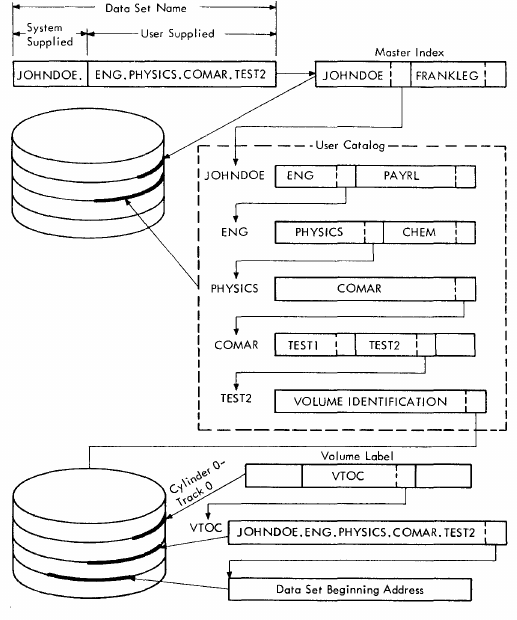 The TSS catalog. Source: TSS System Concepts and Facilities Guide on Bitsavers
Data set names and the catalog
Instead of files, on TSS/360 we think about data sets, which are named collections of related records.
Data sets are collected into catalogs: the top level catalog contains
one catalog for each user. Logged in as user TSS, you can see your
catalog by typing PC? for print catalog:
pc?
DATA SETS IN CATALOG WITH QUALIFIER TSS*****
TSS*****.EREPOUT,   ACCESS: RO
TSS*****.SYSERP.G0004V00,   ACCESS: RW
TSS*****.GENMAC.G0005V00,   ACCESS: RW
...
TSS*****.SOURCE.HWORLD,   ACCESS: RW
A fully qualified data set name is a series of one or more names
(called qualifiers) separated by dots. The first level is the user ID,
so for our hello world program SOURCE.HWORLD under the user account
TSS the fully qualified data set name would be TSS.SOURCE.HWORLD.
You omit the user ID when dealing with your own data sets. Fully
qualified data set names can be up to 35 characters long.
Partially qualified data set names represent a group of data sets,
which acts somewhat like a directory on Unix. For example, the TSS
user has two data set,s SOURCE.HWORLD and SOURCE.SYSGEN, doing PC?
SOURCE will expand the partially qualified name and show both data sets.
pc? source
DATA SETS IN CATALOG WITH QUALIFIER TSS*****.SOURCE
TSS*****.SOURCE.SYSGEN,   ACCESS: RW
TSS*****.SOURCE.HWORLD,   ACCESS: RW
There's no concept of wildcards on TSS/360.
Data set types
On operating systems like Unix, files are a collection of bytes and it's up to each program how to interpret them. But TSS/360 has several built-in types.
- Sequential - an unordered collection of records, for example a list of numbers that are an input to a program.
- Indexed - an ordered collection of records with a given key for each record. An example here, surprisingly, is a source code data set where each line is referenced by its line number.
- Region - like indexed, but also splits the data set into a number of different sections referenced by a region name.
- Partitioned - a group of several data sets from the above types contained in a single data set where each can be accessed separately. Similar to Unix libraries which are collections of object files with a header saying where to find them, but TSS/360 goes beyond this to collect all object code into a partitioned data set rather than it being a separate step.
You can find out what type a data set is with the DSS? command. Here we
see SOURCE.HWORLD has the VI organisation, which means indexed.
dss? source.hworld

TSS*****.SOURCE.HWORLD
VOLUME: TSSRES (3330)
ORGANIZATION: VI             PAGES: 1
REFERENCED: 351/26           CHANGED: 350/26
RECORD FORMAT: V             RECORD LENGTH: 132
KEY LENGTH: 7                KEY POSITION: 4
The following codes are used:
| Organisation | Meaning |
| VS | Sequential |
| VI | Indexed or region |
| VP | Partitioned |
Symbolic data definitions
Symbolic data definitions map a logical data set name to a physical
data set. For example, programs read input from SYSIN and write to
SYSOUT. In interactive use these will be the keyboard and terminal; in
batch mode this will be the card input and the printer. It's possible
to manipulate these from the command line using the
DDEF and RELEASE commands; we'll see an example of doing this when programming
with Fortran in a later post.
Creating and editing data sets
As well as being manipulated by programs, you can create and modify
your own data sets. EDIT can be used for indexed or region data sets.
Plain sequential data sets use a completely different editor called
DATA. We'll look at both of these in more detail in a later post.
Renaming, copying and deleting data sets
To rename a data set, use CATALOG with the U (update) and NEWNAME options. For
example, to rename FOO to BAR:
catalog foo,u,newname=bar
The CDS command is used to copy data sets, for example to copy
SOURCE.ABC to SOURCE.XYZ you would do:
cds source.abc,source.xyz
To remove a data set, use ERASE.
Partitioned data sets
As mentioned above, partitioned data sets are collections of data
sets; you can see the contents of a partitioned data set with POD?.
Here we see our HWORLD object module in our user library USERLIB.
pod? userlib
SYSPRD
SYSPRO
HWORLD
SYSFCL
Each member of a partitioned data set can be accessed by giving the
member's name in parentheses, so USERLIB(HWORLD) points to our
object data set.
Partitioned data sets can be constructed using the copy data set CDS
command. Say we have two source data sets SOURCE.MOD1 and
SOURCE.MOD2 we want to add to a new partitioned data set MYSRC:
cds source.mod1,mysrc(mod1)
cds source.mod2,mysrc(mod2)
Removing members is done by ERASE:
pod? mysrc
MOD1
MOD2

erase mysrc(mod1)
pod? mysrc
MOD2
Generation data groups
As we saw in the quick tour, data sets can be marked as generational
to keep older versions around. You use CATALOG to define a data set
and the number of versions - here I create a data set BAR with up to
5 versions.
catalog gno=5,gdg=bar
Rather than automatically saving a copy each time you make a change
(like VMS), you need to assign it explicitly by taking an existing
data set and using CATALOG to rename it as a new generation.
Here I create two versions of bar by editing the data set foo and
using catalog to add a new generation by assigning to bar(+1).
edit foo
0000100 This is the first version
0000200 _end
catalog foo,u,,bar(+1)
edit foo
0000100 This is the second version
0000200 _end
catalog foo,u,,bar(+1)
We can then see the current version by accessing BAR(0) and the
older version with BAR(-1) with the LINE? command, which types its
contents.
line? bar(0)
0000100 THIS IS THE SECOND VERSION
line? bar(-1)
0000100 THIS IS THE FIRST VERSION
If we use, say, ERASE to delete BAR, this is seen as a partially
qualified data set name (as there are two versions around) and we are
prompted for each version.
erase bar
 ENTER E TO ERASE,R TO RETAIN,A TO ERASE ALL
 BAR.G0000V00
e
 BAR.G0001V00
e
Data set sharing
It's possible to share access to data sets with other users. This is a
two step process: first the owner needs to mark the data set as
available using PERMIT which takes the data set name, the user list
(or *ALL for all users) and a sharing specification which can be
RO or RW as expected, or U for unlimited (can erase or change
permissions) or R to revoke previous access. Here we make our hello
world source available to all users as read only:
permit source.hworld,*all,ro
The user who wants to access this then uses SHARE to create an entry
in their catalog that points to the shared data set. If you switch
over to the operator console and type
share hw,tss,source.hworld
you can now access it under the name HW. The DSS? command shows
this connection:
dss? hw

SYSOPER0.HW
    SHARED ACCESS: RO      OWNER: TSS*****
VOLUME: TSSRES (3330)
ORGANIZATION: VI             PAGES: 1
...
To remove this link to the shared data set, you use DELETE. ERASE
would not work as this would try to remove the underlying data set,
and we were granted read-only access.
erase hw
 PROCEEDING: HW                                  NOT YOURS TO ERASE.
delete hw
Command summary
Here are the main commands used to manipulate data sets.
| Command | Meaning |
|---|---|
| CATALOG | Tasks such as renaming or creating generational data sets |
| CDS | Copy a data set |
| DDEF | Define a data set for connection to a program |
| DDNAME? | List DDNAMES for connections to a program |
| DELETE | Remove logical catalog entry, eg a link to a shared data set |
| DSS? | Print full details of data sets |
| ERASE | Remove physical catalog entry for a data set |
| JOBLIBS | Manipulates DDNAMES, eg to adjust which library to use |
| PC? | Print catalog, ie a directory listing |
| PERMIT | Grant access to a data set |
| POD? | Display contents of a partitioned data set |
| RELEASE | Remove previously set up DDEF connection |
| SHARE | Get access to a data set made shareable by PERMIT |
Further reading
On Bitsavers, IBM Time Sharing System Concepts and Facilities introduces the concepts behind data sets and IBM Time Sharing System Command System User's Guide describes each command in more detail.
Questions, corrections, comments
I welcome any questions or comments, and also especially any corrections if I have got something wrong. Please email me at rupert@timereshared.com and I will add it here and update the main text.