CTSS: Lisp

Two of the oldest programming languages still in use today debuted on the IBM 7x series of computers in the late 1950s. Last time we looked at Fortran, today it's the turn of Lisp.

Lisp on CTSS

John McCarthy and colleagues developed the first version of Lisp at MIT. It originally targeted the IBM 704 and had its own batch operating system (called Overlord) and assembler. The first fully working version was called Lisp 1.5 and documented in the 1962 book LISP 1.5 Programmer's Manual. It was originally developed as an interpreter but a compiler, written in Lisp, was soon added.

At this point in history, the notation for list expressions was not the universal S-expression we know today. The book uses M-expressions, which has square brackets. There was also the 'doublet form' used to enter expressions at the top level. For example, take this CONS expression which takes as parameters the symbol A and the list (B C) to form (A B C):

Type Expression
S-expression (CONS (QUOTE A) (QUOTE (B C)))
M-expression cons[A; (B C)]
Doublet form CONS (A (B C))

Internally, Lisp stored two 15 bit cells in each 36 bit machine word, with the left hand cell taking up the space used by the address portion of the word when viewed as a IBM 7x machine code instruction, and the right hand cell in the decrement portion. This led to the primitive functions CAR and CDR used to access the address and decrement portions; these functions are still used today despite the link to the original hardware being long gone.

The version we have today derives from a port of this original code to CTSS in around 1965. Although the 1969 CTSS Programmer's Guide indicates that features specially for CTSS were added, such as a listen mode where commands could be typed interactively, the version we have seems to be an earlier one that does not have this.

The Lisp binary contains only definitions of fundamental functions like CONS, CAR etc; higher level standard functions such as REVERSE or even DEFINE were done in Lisp as an external library. This library can be loaded into the interpreter and then core saved to a new executable file, speeding up invocation of programs.

TPK in Lisp

Below is an implementation of the TPK algorithm in Lisp 1.5, taking into account the limitations mentioned above.

  • Library functions, namely DEFINE, APPEND, REVERSE, SQRT and ABS, are implemented separately in a library; I took DEFINE

from existing code and provided implementations for the others based on the Programmer's Manual.

  • As there is no interactive input, the numbers acting as input to TPK

are hard coded into the function call.

DEFINE ((
    (F (LAMBDA (X) (PLUS (SQRT (ABS X)) (TIMES 5 (EXPT X 3))))
    )
    (LIMIT-F (LAMBDA (X) (PROG (RESULT)
         (SETQ RESULT (F (CAR X)))
         (RETURN (COND
                  ((GREATERP RESULT 400) (QUOTE TOO-LARGE))
                  (T RESULT)))))
    )
    (TPK (LAMBDA (NUMS)
                 (MAPLIST (REVERSE NUMS) (QUOTE LIMIT-F)))
    )
))

TPK ((10 -1 1 2 3 4 4.3 4.305 4.303 4.302 4.301))
STOP

This uses doublet form to invoke functions and the indentation is what was commonly used at the time.

The code should be read from bottom to top.

TPK reverses the list and calls MAPLIST on this, which will call LIMIT-F 11 times with lists formed by removing the first item in turn, ie (10 -1 1 2 ...), (-1 1 2 ...) (1 2 ...) etc. MAPCAR would be a better choice on more modern Lisps.

LIMIT-F uses a PROG and a local variable RESULT so the function F is only called once per number. The COND checks the result and returns the symbol TOO-LARGE if over 400, else the result.

Running TPK

The first step is to load the library file created for this project into the base Lisp interpreter, and save the resultant binary to a new excitable file.

lisp lib
W 1818.8
06978   
 VALUE
 NIL  
 VALUE
 DEFLIST
 VALUE  
 DEFINE
 VALUE 
 (APPEND REVERSE SQRT ABS)
R .016+.066               
           
save mylisp
W 1818.9
R .000+.066

This can then be run against the solution.

r mylisp tpk
W 1819.0
 VALUE  
 (F LIMIT-F TPK)
 VALUE          
 ( 0.39988629E3 TOO-BIG TOO-BIG TOO-BIG  0.39960863E3  0.322E3
  0.13673205E3  0.41414213E2  0.6E1 -0.4E1 TOO-BIG)           
R .016+.050

Full details on Github.

Further information

A great deal of information on the history of Lisp can be found at softwarepreservation.org.

Questions, corrections, comments

I welcome any questions or comments, and also especially any corrections if I have got something wrong. Please email me at rupert@timereshared.com
CTSS: Fortran II translator

Fortran became a very popular language for scientific computation on the IBM 7x series soon after its creation in 1957. Although it could run as a FMS batch job, it was not available for online users of CTSS - according to Tom Van Vleck 'IBM FORTRAN II would not run in CTSS foreground, because the FORTRAN compiler was a complex multi-pass monster.'

What was available was a translator from Fortran to MAD called MADTRN. This would take a Fortran file as input (with name2 of MADTRN), translate it to MAD and then compile it. The CTSS Programmer's Guide does provide some warnings on its use, however:

MADTRN does not always produce perfect results and, therefore, should not be used unless absolutely necessary. MADTRN assumes a working Fortran program and therefore MADTRN diagnostics are minimal.

In any case, let's try this out on CTSS by implementing the TPK algorithm.

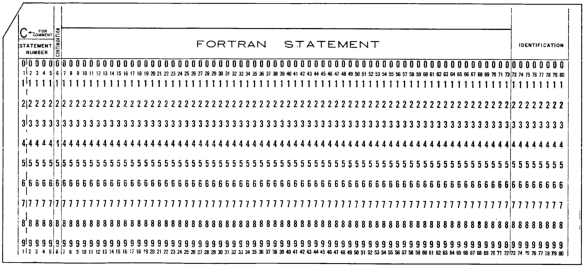
/images/ctss/fortran-punched-card.png

Blank Fortran punched card. Source: IBM 7090/7094 Programming Systems: FORTRAN II Programming

TPK in Fortran II

This is based on Knuth's Fortran I version in the original paper. See the file on Github or the annotated version below.

The source format, as shown in the illustration above, is fixed, with C in column 1 indicating a comment, line numbers in cols 1-85 and code starting at column 7.

  C     TPK ALGORITH IN FORTRAN II
        FTPKF(X)=SQRTF(ABSF(X))+5.0*X**3                         ②
  C     MAIN PROGRAM
        DIMENSION A(11)
        N=11
        PRINT 100
   100  FORMAT(23HPLEASE ENTER 11 NUMBERS)                       ⑦
        READ 101,A                                               ⑧
   101  FORMAT(F9.4)
        PRINT 102
   102  FORMAT(11HRESULTS ARE)
        DO 3 J=1,N                                               ⑫
        RESULT=FTPKF(A(J))
        IF (RESULT-400.0) 2,2,1                                  ⑭
   1    PRINT 103
   103  FORMAT(9HTOO LARGE)
        GO TO 3
   2    PRINT 101,RESULT
   3    CONTINUE
        STOP
        END

The function to be called is on line ②, and is an example of a single expression function. Note that functions have to end with the letter F, including built in ones like SQRTF.

Variable types are indicated by the first letter: I - N means an integer, otherwise it is floating point.

Strings can be printed, as shown on line ⑦, but need to be incorporated in the format definition as the string length followed by H.

Arrays can be read in by a single statement as shown on line ⑧. However something odd is going on here - see the section "The case of the reversed READ" below.

Line ⑫ introduces a loop. ⑭ is a 'computed if', with the test expression being compared against zero and a branch taken to the first, second or third label if the result is less than, equal to or greater to the test. So here if RESULT is > 400 control will transfer to label 1, otherwise to label 2. This is the only 'if' syntax available in Fortran II.

Compiling the program

To compile, run MADTRN TPK, optionally with the (LIST) switch.

Noe that MADTRN will create TPK MAD as its output before compiling it, so if you already have TPK MAD from the previous post in your directory it will be overwritten.

As indicated by the warning in the manual, if there is a mistake it is unlikely to be caught until the MAD program is compiled which means you need to trace back from the translated source. The only MADTRN diagnostic I could get was if I forgot the END statement:

****ERROR 20
*****NO END CARD *****
PROBABLE ERROR IN MADTRN FILE.
MAD FILE CREATED,USE AT OWN RISK.

Otherwise, the compile and execution is straightforwards:

madtrn tpk (list)
W 1905.1
LENGTH 00205.  TV SIZE 00006.  ENTRY 00055
R .033+.066                               
           
loadgo tpk
W 1905.2
EXECUTION.
PLEASE ENTER 11 NUMBERS
...

The MAD output of the translator is reasonably clean so could be used as a starting point for further development.

The case of the reversed READ

Added May 2025.

As mentioned above, line ⑧ reads in an entire array. However, MADTRN stores this array backwards, ie the first number input is stored in A(11), the second in A(10) etc. Looking at the generated MAD code we can see it does this by giving the array backwards:

                 READ FORMAT QQ0004,A(11)...A(1)

As the array is already read in backwards, there is no need to further reverse it.

Why it does this, I do not know. I was able to get this code running on a real Fortran II compiler on IBSYS, and the READ populated the array from A(1) to A(11). Looking at the Fortran I and II specs indicate that arrays are stored backwards in memory, due to the decrement nature of IBM 7090 index registers, but this storage is transparent to the user and the READ is done in natural, ie incremental form. So is this a bug in MADTRN? If you have more information, please let me know.

Further information

The IBM manual IBM 7090/7094 Programming Systems: FORTRAN II Programming is a short and readable guide to the language.

There's lots of information about early Fortran at softwarepreservation.org.

Questions, corrections, comments

I welcome any questions or comments, and also especially any corrections if I have got something wrong. Please email me at rupert@timereshared.com


CTSS: MAD language

MAD - the Michigan Algorithm Decoder - was a ALGOL inspired language commonly used for scientific programming on the IBM 7x series of computers. It was conceived by Bernard Galler and colleagues at the University of Michigan in 1959. A version from around 1963 was ported to CTSS, where it was used to write many of the system utilities such as LISTF.

To demonstrate MAD and how to write programs in it on CTSS, I will show an implementation of the TPK algorithm.

What is the TPK algorithm?

See the repo project-tpk for more details, but basically this was developed by Donald Knuth and Luis Trabb Pardo for a paper about early (pre-1957) languages. It does the following

    read 11 numbers to an array
    for each x in in reverse order of the array
        calculate √|x| + 5x³
        print that number if ≤ 400, else print TOO BIG

which is not supposed to be a useful task, but demonstrates many typical language features like I/O, loops, arrays, functions and conditionals.

TPK in MAD

Here is the complete program.

          R TPK ALGORITHM IN MAD                                 ①
          R FUNCTION F                                           
           INTERNAL FUNCTION(X)                                  ③
           ENTRY TO F.                                           
           FUNCTION RETURN SQRT.(.ABS.X) + 5 * X.P.3             
           END OF FUNCTION                                       ⑥
          R MAIN PROGRAM                                         
           INTEGER N,J                                           ⑧
           N = 11                                                
           DIMENSION NUM(11)                                     ⑩
           VECTOR VALUES FMT = $F9.4 *$                          ⑪
           PRINT COMMENT $PLEASE ENTER 11 NUMBERS$               ⑫
           THROUGH INPUT,FOR J=0,1,J.GE.N                        ⑬ 
INPUT      READ FORMAT FMT,NUM(J)                                ⑭
           PRINT COMMENT $RESULTS ARE$                           
           THROUGH CALC,FOR J=N-1,-1,J.L.0                       ⑯
           RESULT = F.(NUM(J))                                   
           WHENEVER RESULT.G.400                                 ⑱
           PRINT COMMENT $TOO LARGE$                             
           OTHERWISE                                             
           PRINT FORMAT FMT,RESULT                                     
CALC       END OF CONDITIONAL                                    ㉒
           END OF PROGRAM

Numbers in circles (like ①) are for reference below, not part of the program. You can download the machine readable file from github.

The layout is fixed, with

  • columns 1-10 containing an optional line label
  • column 11 contains R if the line should be treated as a comment (such as line ①), or a digit if it is a continuation line, blank otherwise
  • code is in columns 12-72
  • columns 73-80 are optional sequence numbers, useful for punched cards

Lines ③-⑥ contain the function F. to do the calculation. Functions can share code have multiple entry points indicated by ENTRY TO. Functions are denoted by a dot on the end, eg F., SQRT., whereas language operators have dots before and after, like .ABS. and .P. (power).

The main program starts at ⑧ with some variable definitions. Default type for undefined variables is floating point (can be overridden per program file with eg NORMAL MODE IS INTEGER). ⑩ introduces an array of floats called NUM.

⑪ defines and initialises an array of six-bit BCD characters; the $ indicates the character type. The contents of ⑪ is a format specification, similar to a C scanf string, requesting floating point.

⑬-⑭ is a loop, delimited by the label INPUT, to read in 11 floating point numbers from the user.

⑯-㉒ is another loop to execute the function on each array item in reverse order, with a conditional in ⑱-㉒ to display TOO LARGE or the result of the function.

One other language feature not used here is the ability to abbreviate keywords: instead of typing WHENEVER you can use W'R, or E'M instead of END OF PROGRAM.

Compiling and running

See the guides on how to upload or edit files to enter the program into the system.

MAD TPK will compile this file and create an object file TPK BSS. The compiler has two optional arguments

  • (LIST) to produce a full listing file in TPK BCD
  • (SYMB) to include symbols in the object file for debugging.
mad tpk (list)
W 1831.4
LENGTH 00211.  TV SIZE 00007.  ENTRY 00040
R .016+.016

Run the program directly with LOADGO TPK, or save it to an executable file that can be used later, and run it via

    LOAD TPK
    SAVE TPK
    R TPK

(see this previous post on how loading works on CTSS.)

When running the program, you need to include a decimal point in each item to indicate its type, so you'd enter 1 as 1.. An example run:

loadgo tpk
W 1831.7
EXECUTION.
PLEASE ENTER 11 NUMBERS
10.                    
-1.
1.
2.
3.
4.
4.3
4.305
4.303
4.302
4.301
RESULTS ARE
 399.8863  
TOO LARGE
TOO LARGE
TOO LARGE
 399.6086
 322.0000
 136.7320
  41.4142
   6.0000
  -4.0000
TOO LARGE
  EXIT CALLED. PM MAY BE TAKEN.
R .150+.016

See github for the compile/run transcript, and the full listing.

Further reading

I have not been able to find the language reference for this particular version of MAD, but this manual from the University of Illinois on bitsavers is close. Also there is Bernard Galler's introduction to programming using MAD, The Language of Computers.

CTSS project director Fernando Corbato wrote an abbreviated guide to MAD in MIT Computer Center Memo 213, but the print quality is not great so this is hard to read.

ELIZA is a good example of a larger program written in a mix of MAD and assembly language.

I have written about GOM (Good Old MAD), a later version of MAD for MTS on the System/370 over at try-mts.com.

Questions, corrections, comments

I welcome any questions or comments, and also especially any corrections if I have got something wrong. Please email me at rupert@timereshared.com


CTSS: Programming

Today we'll look at languages and other programming facilities on CTSS. Page numbers listed below are from the CTSS Programmer's Guide,

As in the previous section on CTSS commands, in some cases a command is described in the guide but is not available on the emulated systems, which is shown using strike through. This is because the CTSS we have today was reconstructed from a listing tape which does not include every command that was present then.

Languages

Command Meaning Guide
FAP IBM 7094 Assembler p306
MAD Michigan Algorithm Decoder p315
MADTRN Fortran II to MAD translator p318
LISP List Processing Language p314
AED ALGOL Extended for Design p293
BEFAP Bell Laboratories' 7094 Assembler p294
COGO-90 Coordinate Geometry Language p295
COMIT String Processing Language p296
DYNAMO Model Simulation Language p303
GPSS General Purpose System Simulator p313
SNOBOL String Manipulation Language p319
OPS Online Programming System p320
TIP Technical Information Program p321
FOR4 Fortran IV to MAD Translator p322
FORMAC Desk Calculator p324

The languages CTSS was developed in (FAP assembly and MAD) are available, along with a translator from FORTRAN to MAD and an early LISP implementation.

The other languages are not available. I speculate that these were not maintained by the Computation Center hence were not on the listing tape used to reconstruct CTSS. The IEEE 50th anniversary retrospective document has a section on the origin and importance of some of these languages.

Loading, saving and starting programs

Command Meaning Guide
LOAD Load a program into memory p422
L Load a program into memory, providing more table space p422
LOADGO Load a program into memory and start it p422
VLOAD Load a program into memory, remove the loader p422
NCLOAD Load a program into memory, remove the loader and commons p422
LDABS Load a program into memory without relocation, p428
USE Supply missing modules when loading a program p422
SAVE Save a dormant program p341
MYSAVE Save a dormant program and the state of its files p341
START Start a program in memory p430
RSTART Restart a chain of programs in memory p430
RESTOR Loads a program into memory from disk p430
RECALL As RESTOR, but also restores old command line args p430
RESUME Loads and runs a program. Can be abbreviated to R p430
CONTIN Load and continue a saved chain of programs p430
DO Execute a saved program from common files p440
LAED Loader for the AED language p432
PLOAD Simulate the loading process p441
BLIP Show a message every few seconds of program execution p442
RUN Used by TIP to execute programs p443

The paradigm for creating user programs and running them is different from modern operating systems. As an example, on Unix if you have a main program main.c and two modules a.c and b.c you might compile them to a binary foo as follows:

    cc -c a.c
    cc -c b.c
    cc -o foo main.c a.o b.o

The first two commands make object files a.o and b.o. The last command compiles main.c and then invokes the linker to bind together the three modules into an executable file called foo.

Now let's say we are on CTSS and programming in MAD instead of C, so now we have three files A MAD, B MAD, and MAIN MAD. First we compile each of the components:

    MAD A
    MAD B
    MAD MAIN

Now we have object files called A BSS, B BSS, MAIN BSS.

Instead of linking them to a disk file, we load them into memory:

    LOAD MAIN A B

At this point you can start the program immediately - without ever creating an executable file - with

    START

The LOADGO command is basically a LOAD followed by a START.

Instead of starting, we could save the memory image to a SAVED file:

    LOAD MAIN A B
    SAVE FOO

This creates a file called FOO SAVED. It can then be loaded and started with RESUME, or simply with R:

    R FOO

SAVE can be run at any time for a user program. Say you have a program that on start up reads a configuration file, parses it and then enters a loop where it prompts for a command and prints a response. (For example, ELIZA!) If you pressed the interrupt key after the config file was loaded and then ran SAVE, the file it creates would allow you to restart the program at the same point, ie within the prompt-response loop rather than right at the beginning. Similarly, if you have a job which does a lot of calculation, you could interrupt it, save the current state, log off, and come back later and restart it at the saved point.

These are the load/save commands you will use the most often; the others in the table are useful in specific scenarios. For example, L allows more object files to be loaded at the expense of space available for the program.

Library management

Command Meaning Guide
EXTBSS Extract a BSS file from a COMBIN-ed library p411
UPDBSS Update a BSS file in a COMBIN-ed library p411

Libraries of object (BSS) files are created on CTSS by using COMBIN. For example, to create library MYLIB BSS from two objects A BSS and B BSS:

    COMBIN * MYLIB BSS A B

(the * means don't change the line numbers in the object file).

Once created, these libraries can be manipulated with the above commands.

Using our example from the previous section, instead of loading each object file:

    LOAD MAIN A B

with a library file we can now use the (LIBE) option:

    LOAD MAIN (LIBE) MYLIB

Debugging

Command Meaning Guide
FAPDBG Symbolic debugger for assembly language programs p449
MADBUG Symbolic debugger for MAD language programs p459
DEBUG CTSS symbolic debugger p486
PM Print post mortem information about a program p473
STOPAT Set a breakpoint p479
PATCH Modify a program's memory image p479
TRA Transfer when reaching a certain address p479
SPATCH Absolute program patching p477
STRACE Trace a running program p480
SD Supervisor debug printing p478
SP Supervisor debug patching p478
STOMAP Print storage (memory) map p503

The standard library

CTSS also had a comprehensive library of functions available to programmers, both from assembly and high level languages like MAD. These are documented in the CTSS Programmer's Guide section AG (p108 onwards) and cover

  • Console I/O
  • File I/O and status
  • Tapes and pseudo tapes
  • Error handling and program status
  • Command and subsystem control
  • Conversion (eg number to BCD string)
  • Timers

"Pseudo tapes" here means when a program tries to access a tape - eg via language constructs like MAD's READ BCD TAPE statement - it is redirected to a disk file, as regular users would not have access to physical tapes.

Questions, corrections, comments

I welcome any questions or comments, and also especially any corrections if I have got something wrong. Please email me at rupert@timereshared.com


CTSS: RUNCOM and FIB: scripting and background jobs

Another first for CTSS was the idea of collecting a sequence of interactive commands into a script file that could be run as a single unit, which helped simplify complex or repetitive tasks. The command that does this is called RUNCOM, for Run Commands. This influenced the Multics shell and the terminology carried over to Unix in file names containing the letters rc, eg /etc/init.rc.

Associated with this is FIB, the Foreground Initiated "Background" batch job scheduler, which allows you to execute RUNCOM jobs without being logged in. Let's take a look at both. Note that FIB is different from the ability to run FMS batch jobs, which existed before CTSS.

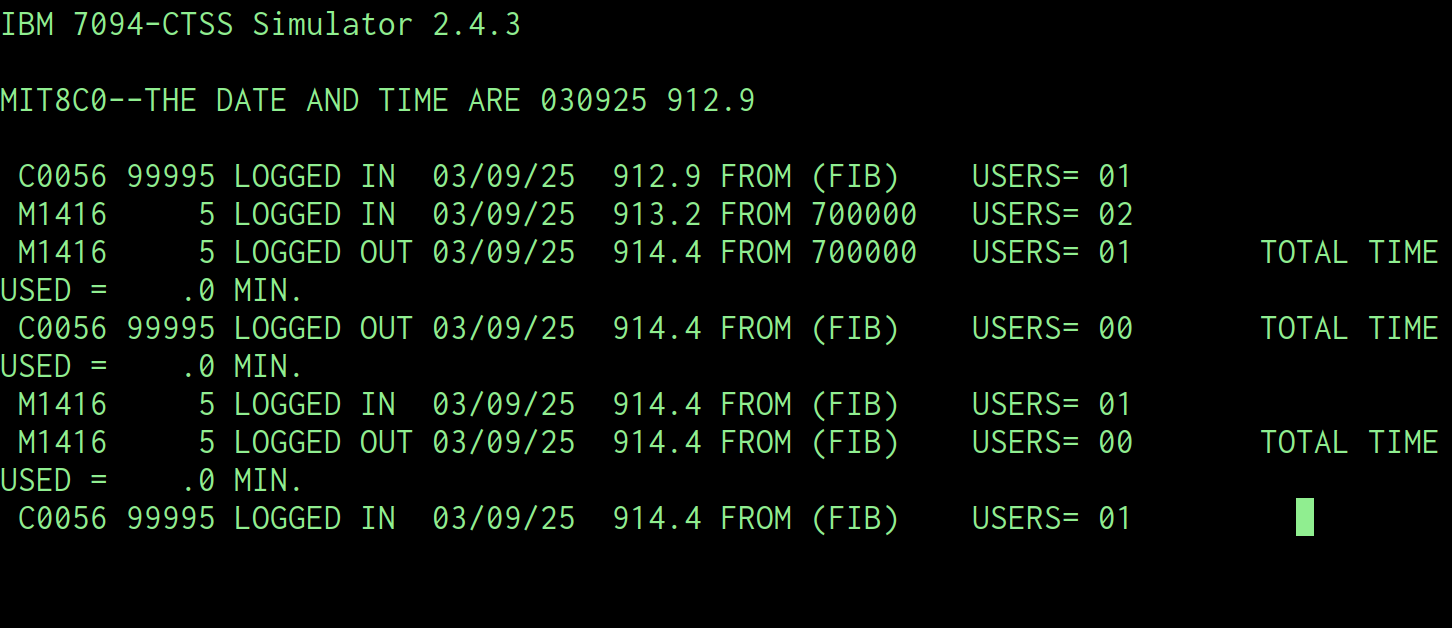
/images/ctss/running-fib.png FIB running a job submitted by GUEST.

Using RUNCOM

At its simplest, this is just a text file with name2 of RUNCOM containing a list of commands to run in order. For example, if I am editing, printing, compiling and running a program FOO I could write the following to a file DEV RUNCOM

EDL FOO MAD
P FOO MAD
MAD FOO
LOADGO FOO

and then type RUNCOM DEV to execute it.

By using parameters we can generalise this to work with other source code files. Parameters are introduced with the CHAIN statement.

CHAIN PROG
EDL PROG MAD
P PROF MAD
MAD PROG
LOADGO PROG

and then executed by typing, for example RUNCOM DEV FOO.

We can generalise further to allow MAD and FAP code to be developed by noticing that the name2 and translator can be parameterised as one item:

CHAIN PROG TRANS
EDL PROG TRANS
P PROF TRANS
TRANS PROG
LOADGO PROG

and run as RUNCOM FOO MAD

Optional parameters can be introduced using (NIL). Say sometimes I want to give options to the translator command, like (LIST). I can change the runcom file to be:

CHAIN PROG TRANS OPT
EDL PROG TRANS
P PROF TRANS
TRANS PROG OPT
LOADGO PROG

and then invoke as RUNCOM FOO MAD (NIL) if I don't want any options, or RUNCOM FOO MAD (LIST) if I want the compile command to be MAD FOO (LIST).

(END) is a similar parameter which will end the line at that point if detected.

Finally, a line starting with * in the runcom file will act as a comment; a line starting with $ will be echoed to the console.

Using FIB

FIB allows you to submit a runcom file for later execution. It is invoked as:

    FIB NAME1 -LIMIT- -TIME- -DAY-

where NAME1 is the name1 of a runcom file, eg FOO for FOO RUNCOM.

The next three parameters are optional. LIMIT sets a maximum CPU time in minutes that the job can run for, with a default of 5. The last two set a time and date before which the job cannot start.

Once you submit a job, you can cancel it with DELFIB or query it with PRFIB. Only one job can be submitted at a time.

fib make
W 914.1
R .016+.016
           
prfib
W 914.3
       
JOBNAM  LIMIT   DATE  TIME
                          
  MAKE     5   03/09 0914.1
                           
R .016+.016

In addition to any time/date argument, the job will not run until you have logged out. Behind the scenes, the FIB job switches to your ID and executes the job, as can be seen from the screenshot of the console at the top of this post.

This is because CTSS only allows one task per ID to be running at a time. Had you tried to log in while the job was running, you would see a warning and if you continued the FIB job would be cancelled.

After the job has finished, you will see its console output in a file called $$$FIB OUTPUT. This will be in 12-bit mode, so use P to view the file.

Further details

See the CTSS Programmer's Guide p326 for RUNCOM and p287 for FIB.

Questions, corrections, comments

May 2025: Tom Van Vleck provided a correction for the name of FIB, noted the difference between this and FMS batch jobs and the output format for FIB jobs.

I welcome any questions or comments, and also especially any corrections if I have got something wrong. Please email me at rupert@timereshared.com and I will add it here and update the main text.


← Previous  Next →